Top 5 Editing Tools Small Businesses Need (And How Morrison Media Turns Them Into ROI)
Discover the best photo and video editing tools for small businesses—plus how Morrison Media, LLC in La Crosse helps you turn DIY content into a results-driven marketing engine.
Why Editing Tools Matter for Small Business Marketing
Modern small businesses live and die by their visual content: website photos, Instagram Reels, YouTube tutorials, TikTok clips, Google Business images, and email graphics all shape how customers perceive your brand. Editing tools make it possible to create professional-looking visuals without a full in‑house creative team, as long as you choose platforms that fit your skill level, time, and marketing goals.
But tools alone are not a strategy. Execution—consistent content, strong branding, and SEO-driven messaging—is what separates brands that simply post from brands that actually grow. That’s where a partner like Morrison Media, LLC adds serious leverage for small business owners in La Crosse and the greater Coulee Region.
The Top 5 Editing Tools For Small Businesses
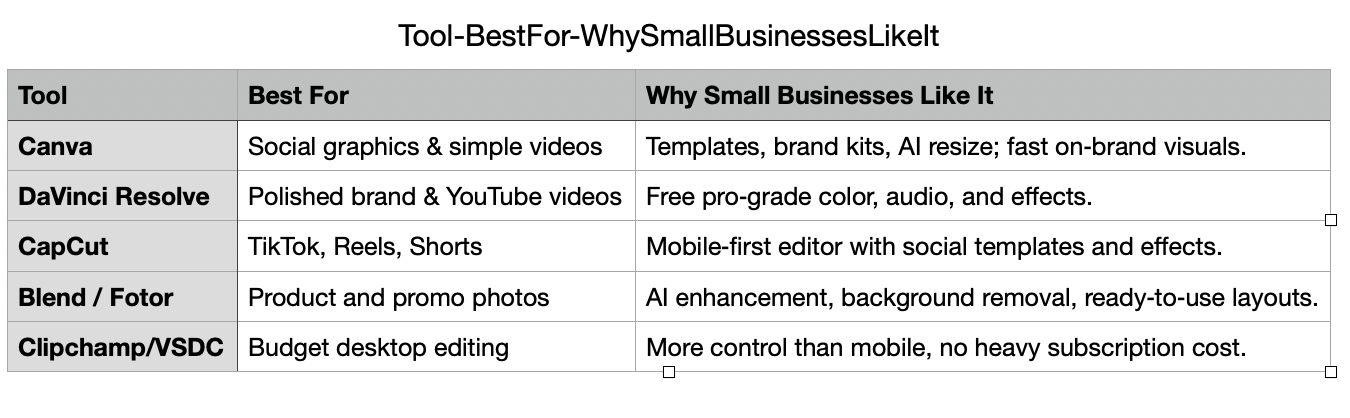
Below are five widely recommended, battle‑tested tools that fit real small‑business workflows: product photos, short-form video, social posts, and website content.
1. Canva (Photo, Video, Social Graphics)
Canva has become a go‑to design and editing platform for small businesses because it combines drag‑and‑drop simplicity with powerful features like templates, brand kits, and AI tools. It’s ideal for social media marketing, ad creatives, thumbnails, and quick photo edits, especially for owners who are not designers but need “done today” content.
Key advantages for small businesses:
Built‑in templates for Instagram, Facebook, YouTube, email headers, and print materials, helping non‑designers stay on-brand across channels.
AI features like Magic Resize and Magic Design to repurpose one visual into multiple formats (e.g., Instagram post → Facebook ad → story) in minutes.
Free plan plus affordable Pro tiers, making it easy to scale as your content production grows.
2. DaVinci Resolve (High‑Quality Video Editing)
DaVinci Resolve is a professional‑grade video editor known for its industry‑leading color grading, advanced audio tools, and robust timeline editing. For small businesses that want more polished YouTube content, brand videos, tutorials, or evergreen ads, Resolve delivers “agency‑level” quality without a subscription fee.
Key advantages for small businesses:
Free version with no watermark and extensive pro features, making it one of the most powerful no‑cost options available.
Integrated color, audio, and visual effects tools so you don’t need separate apps for polishing your content.
Ideal for businesses that care about cinematic brand perception—like professional services, medical practices, or premium local brands.
3. CapCut (Short‑Form Social Video)
CapCut (mobile and desktop) has emerged as a favorite for creators and small businesses producing TikToks, Reels, and Shorts because it’s optimized for vertical video and social formats. It offers intuitive editing, transitions, text, and trending effects built specifically for social platforms, including deep integration with TikTok.
Key advantages for small businesses:
Mobile‑first design that lets owners film, edit, and publish from a phone—critical for documenting behind‑the‑scenes, events, and day‑to‑day operations.
Templates and auto‑captions that speed up content creation and improve accessibility and watch time.
Free to use, lowering the barrier to consistent, daily posting—one of the core growth levers emphasized by creators and SEO advisors like Matt Diamante when they talk about building authority and visibility across search and social.
4. Blend or Fotor (AI Photo Enhancement for Products & Social)
For many small businesses—especially e‑commerce, retail, and service providers—quickly polishing product photos, team headshots, and environment images is more important than learning complex software. AI‑powered photo editors like Blend and Fotor focus on speed and simplicity.
Blend is designed specifically for small businesses and e‑commerce sellers, using AI to remove backgrounds, generate marketing visuals, and repurpose assets across platforms.
Fotor offers AI image enhancement, background removal, portrait retouching, and design templates, making it a practical all‑in‑one solution for non‑technical users.
Key advantages for small businesses:
One‑click improvements (exposure, color, sharpness) for product and lifestyle images without needing a dedicated photographer for every post.
Built‑in templates and layouts to quickly produce social posts, ads, and promo graphics from the same base images.
Free or low‑cost tiers, making it feasible to standardize your photo quality across your website and marketplaces.
5. Clipchamp or VSDC (Budget‑Friendly Desktop Video)
Some small businesses want more control than a mobile app provides but don’t need the full complexity of professional suites. Tools like Clipchamp and VSDC fill that middle ground.
Clipchamp is a browser‑based editor with Microsoft 365 integration, autosave, and stock assets; it’s great for fast social videos, website clips, and explainer content.
VSDC is a Windows‑only editor with advanced effects and color tools, ideal for owners who want timeline editing and creative control without subscriptions.
Key advantages for small businesses:
Suitable for regular weekly content like educational videos, FAQ clips, and video testimonials.
Export presets and project templates help standardize output and save time, which is critical when owners juggle marketing with day‑to‑day operations.
Low or no cost, making it easier to invest budget in strategy, ads, or professional production support instead of just software.
How Morrison Media, LLC Turns Tools Into Real Marketing Results
Owning great editing tools is like owning a professional camera: it doesn’t automatically produce strategic content. Morrison Media, LLC exists to bridge that gap for small businesses in La Crosse, Wisconsin, and the surrounding region by combining professional photography, videography, and digital marketing under one roof.
Here is how Morrison Media becomes a crucial partner in your success:
1. Strategy First: SEO‑Driven Content, Not Just “Pretty Videos”
Experts like Matt Diamante of HeyTony emphasize that tools only matter when they support a clear SEO and content strategy tied to business goals, keyword intent, and buyer behavior. Morrison Media, LLC applies that same philosophy:
Aligns your editing stack (e.g., Canva + CapCut + DaVinci Resolve) with specific business outcomes such as more qualified leads, more bookings, or higher‑value projects.
Builds content plans around high‑intent local keywords (for example, La Crosse photographer, Wisconsin videographer, small business marketing, wedding videography) and formats that Google and social platforms currently reward.
Integrates visuals into full funnel journeys—landing pages, blogs, email, and retargeting ads—so your edited content actually converts.
2. Professional Capture + DIY Editing Support
Because Morrison Media is a full‑service photography and videography studio, you are not starting from low‑quality raw footage or poorly lit images. Instead, Morrison Media can:
Capture high‑end photo and film assets—headshots, branding sessions, event coverage, product shoots, and social content days—that drop seamlessly into your preferred editing tools.
Design reusable templates and editing presets in tools like Canva and DaVinci Resolve, so your team can make quick updates or variations in‑house without breaking your visual brand.
Offer ongoing support and coaching so your staff knows how to cut, crop, resize, and repurpose content for different platforms without starting from scratch.
3. Turning One Shoot Into Months of Content
One of the most effective strategies, echoed by leading content marketers, is to batch‑produce assets and then slice them into multiple formats for search, social, and email. Morrison Media operationalizes that for small businesses by:
Planning shoots around your content calendar—FAQs, service highlights, case studies, testimonials, product launches—so every session feeds multiple campaigns.
Delivering footage and photos structured for editing tools: vertical clips for CapCut, wide shots for DaVinci Resolve, stills and B‑roll for Canva and AI photo editors.
Helping you turn a single shoot into a blog post with SEO images, a YouTube video, 5–10 Reels/Shorts, and a set of on‑brand graphics, aligned with the kind of repurposing frameworks promoted by advisors like Matt Diamante and modern content agencies.
4. Local Expertise and Competitive Positioning
In markets like La Crosse, Onalaska, and the broader Upper Midwest, your competitors are already investing in professional visuals and digital marketing. Morrison Media, LLC differentiates by:
Combining Hollywood‑level production experience with local small‑business sensitivity, making enterprise‑grade visuals accessible to Main Street budgets.
Offering integrated packages—photo, video, and digital marketing—rather than forcing you to coordinate multiple vendors and freelancers.
Focusing on measurable outcomes (inquiries, booked calls, sales) instead of vanity metrics, taking cues from agencies like HeyTony that emphasize ROI-backed SEO and content strategy for business owners.
5. Done‑For‑You, Done‑With‑You, and DIY‑Optimized Options
Not every small business needs a full retainer. Some just need professional scaffolding around their editing tools. Morrison Media can flex up or down:
Done‑for‑you: Fully produced brand films, launch videos, photography packages, and marketing campaigns you can plug straight into your website and social channels.
Done‑with‑you: Collaborative content days, template creation, and editing workflows that let your team own day‑to‑day posting while Morrison Media handles high‑impact assets and complex edits.
DIY‑optimized: Consulting on tool selection, brand kits, presets, and content planning so you get more from tools like Canva, CapCut, DaVinci Resolve, and AI photo editors.
Your Go To Source for all things roi!
If you are a small business owner in La Crosse or the surrounding region and you are already dabbling with tools like Canva, CapCut, or DaVinci Resolve—but not yet seeing consistent leads or sales—Morrison Media, LLC is positioned to help you connect the dots between creativity and conversion. By pairing the right editing tools with professional visuals, local SEO, and strategic content planning, you can build a marketing engine that works 24/7 across Google, Instagram, YouTube, and beyond.
